New features and improvements in Autolog, newest first.
November 2026
Service
Remote Protocol Signing
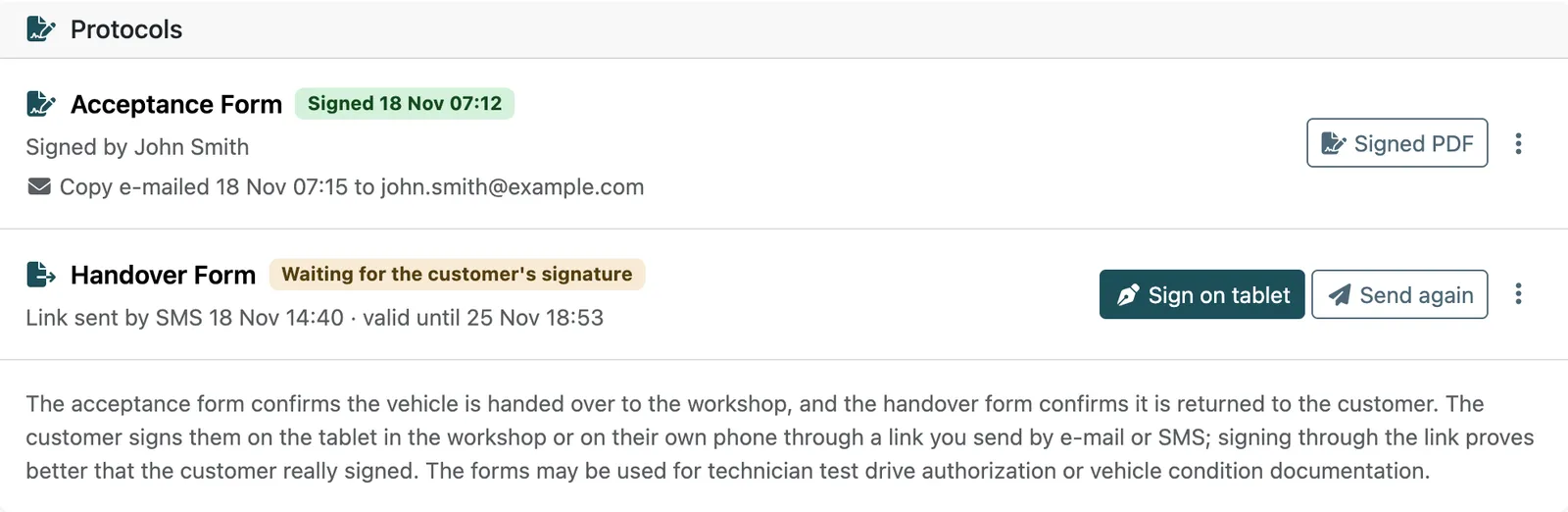
Send the acceptance or handover protocol of a service order to your customer for signing by e-mail or SMS. The customer opens it on their own phone or computer, reads it and signs with a finger or mouse, without signing in.
The link goes only to the e-mail or phone stored with the customer, signs once and is valid for 7 days
The signed PDF states where and when the link went, when the customer opened it and where they signed from, so you can better show that the customer really signed
The service order shows that a link is waiting for the signature, and once signed the status changes to Signed by itself
When signing on the tablet, the customer sees only the protocol without the app menu; right after, you e-mail them a copy and the protocol shows when and to whom it went
An SMS with the link is charged like any other SMS
Service
Service Record by E-mail to the Customer
Send a completed service record to your customer by e-mail straight from its detail. The customer gets a PDF with the work done and the items.
The e-mail names the car and the record number, and you can edit the text before sending
If you are a VAT payer and have "Show VAT Information" turned on, the PDF of a service record, a pricing quote and the service book shows prices and totals with and without VAT
App
A Year of Workshop Activity
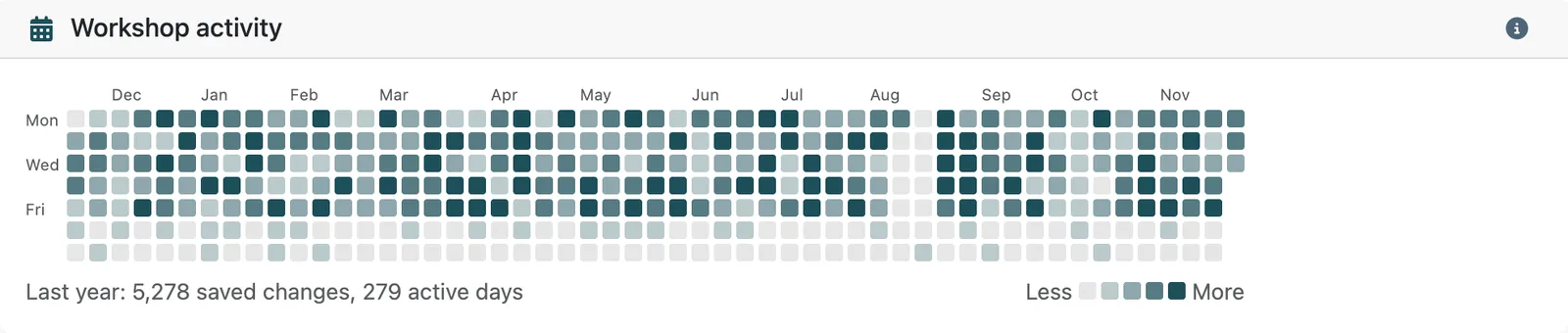
The dashboard shows how much work your workshop saved on each day of the last year. Each square is one day, and the darker it is, the more work it had.
A user's profile and detail show the same overview for that user only
On a phone, tap a day to see how many changes were saved on it
Bookings
Blocking Online Reservations
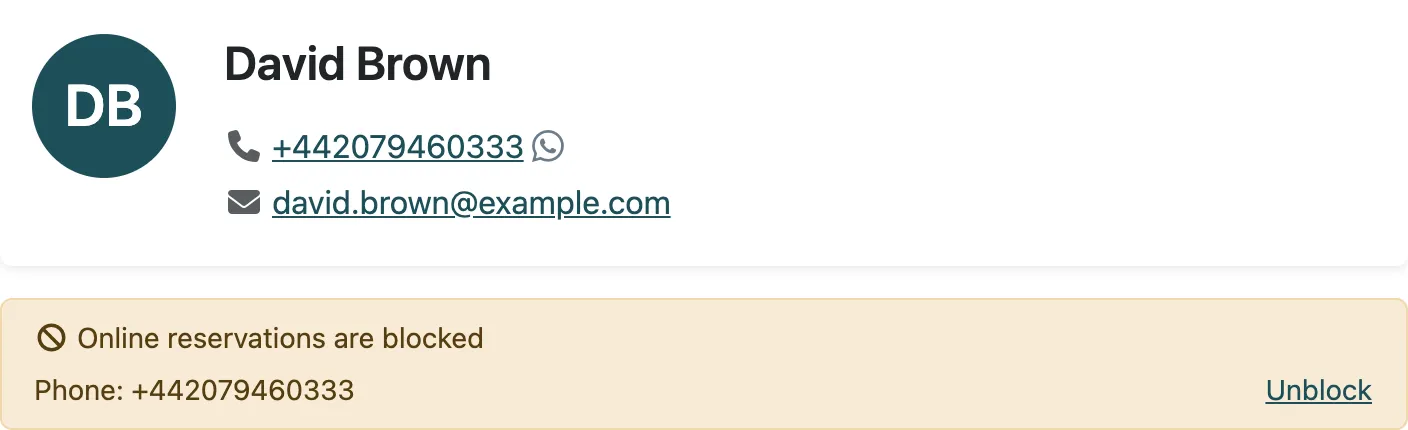
For a customer who, for example, keeps booking and not showing up, block online reservations by phone number or number plate straight from the reservation in the calendar.
The customer sees on the website that the workshop has blocked their online reservations
You can still arrange an appointment yourself; manual booking works as before
You see and remove a block on the car or customer card
October 2026
Invoices & finance
Printing a Price List from Templates
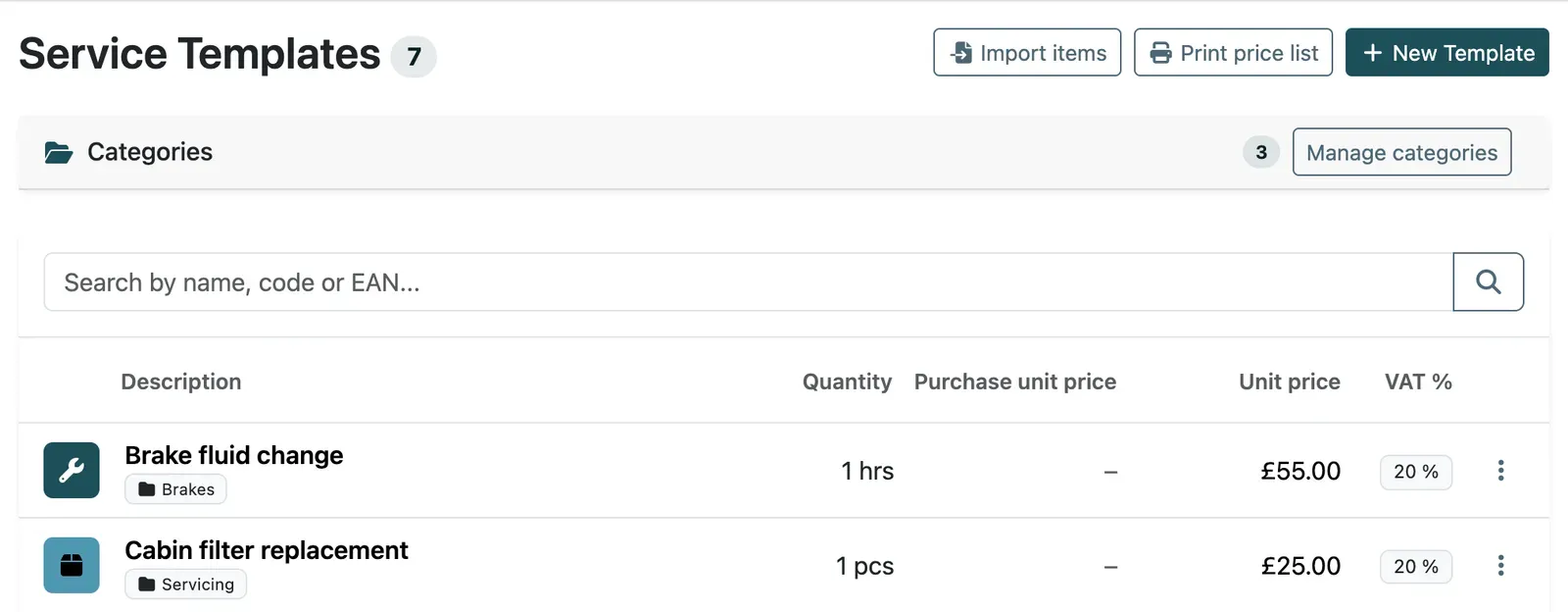
Sort your service record item templates into categories and print a price list for your customers from them, for example for the reception.
Add and rename categories and change their order by dragging
Before printing, choose which categories the price list contains
VAT payers get prices without and with VAT; purchase prices are never printed
Bookings
Every Reservation in One Calendar Window
You create a reservation right in the reservations calendar. Click a free time, find the car or the customer and save the appointment in one window, without going through other pages.
Add a new car and a new customer right while booking
Book without a car too; you add the car when you start the work
Approve a pricing quote and schedule it straight in the calendar
For a tyre change you see right away which tyres you store for the car
On phones and tablets you move a reservation with your finger
Fleet
Connecting a Customer's Fleet Account
Connect a customer who keeps company cars in Fleet with your workshop. Repairs you complete for them are then passed on with prices into their vehicle costs.
Send the invitation from the customer's page as a link, by email, SMS or WhatsApp
The customer accepts it in a new or existing Fleet account and their cars are added to it
Every repair you complete for them afterwards is passed on with its description and price
Fleet
Fleet: Vehicle Costs
Fleet now shows what your vehicles cost. Upload documents to a vehicle, AI reads them and the costs add up together with service prices.
Upload an invoice or receipt to a vehicle as a PDF or photo and AI reads it
Create a service record straight from a service document, with the date, mileage and work description filled in
A costs overview of the whole fleet for a month, a year or your own period, compared with the previous period
Service
Trucks and Buses
Autolog now knows trucks and buses as well, with their services and intervals.
New services with reminders: air dryer cartridge change, chassis lubrication, and brake and air system check
Ready-made interval templates for long haul, distribution, city buses and intercity buses
Fuel prefilter in the service record and on the oil label
Fleet
Fleet: Deadline Calendar
Fleet has a new calendar that shows the deadlines of all vehicles a week, a month or a whole year ahead.
Inspections, services, insurance and other deadlines in one calendar, also as a list
When you complete a recurring reminder, Autolog proposes the next date
Service
AI Reading of Job Items from a Document
You no longer need to retype service record items from a supplier invoice. Upload a PDF or photo of the document and AI prepares the items, which you check before saving.
AI reads parts, labour and other charges, with the part number
Works in the service record, the pricing quote and the direct sale
Service
Tyre Change Season for Stored Tyres
Stored tyres have a new Season tab. It shows how many customers with stored tyres have changed them this season, how many have booked and whom you still need to call.
Changed, booked, appointment passed and not booked in one place for the current autumn or spring season
A list of customers who have not booked, with their phone and rack position
A change counts by the completed Tire change order and, where there is no order, by what is in storage
Cars are counted, not sets, so a car with summer and winter tyres counts once
Every figure has a short explanation of how it is counted
Invoices & finance
Expenses with AI Document Reading
In the new Expenses section you keep supplier invoices, receipts and other documents. Upload a PDF or photo of a document and AI reads its header.
AI reads the supplier, document number, dates, amounts with and without VAT and payment details
You review and confirm every document first, and only then does it count in the totals
Overview of unpaid and overdue documents and the total of expenses for a period
Search by supplier, company ID, document number or variable symbol
Payment QR code for the supplier invoice for Slovak and Czech workshops (PAY by square, QR Platba)
The original document stays attached to the expense
September 2026
Invoices & finance
Advance Invoices
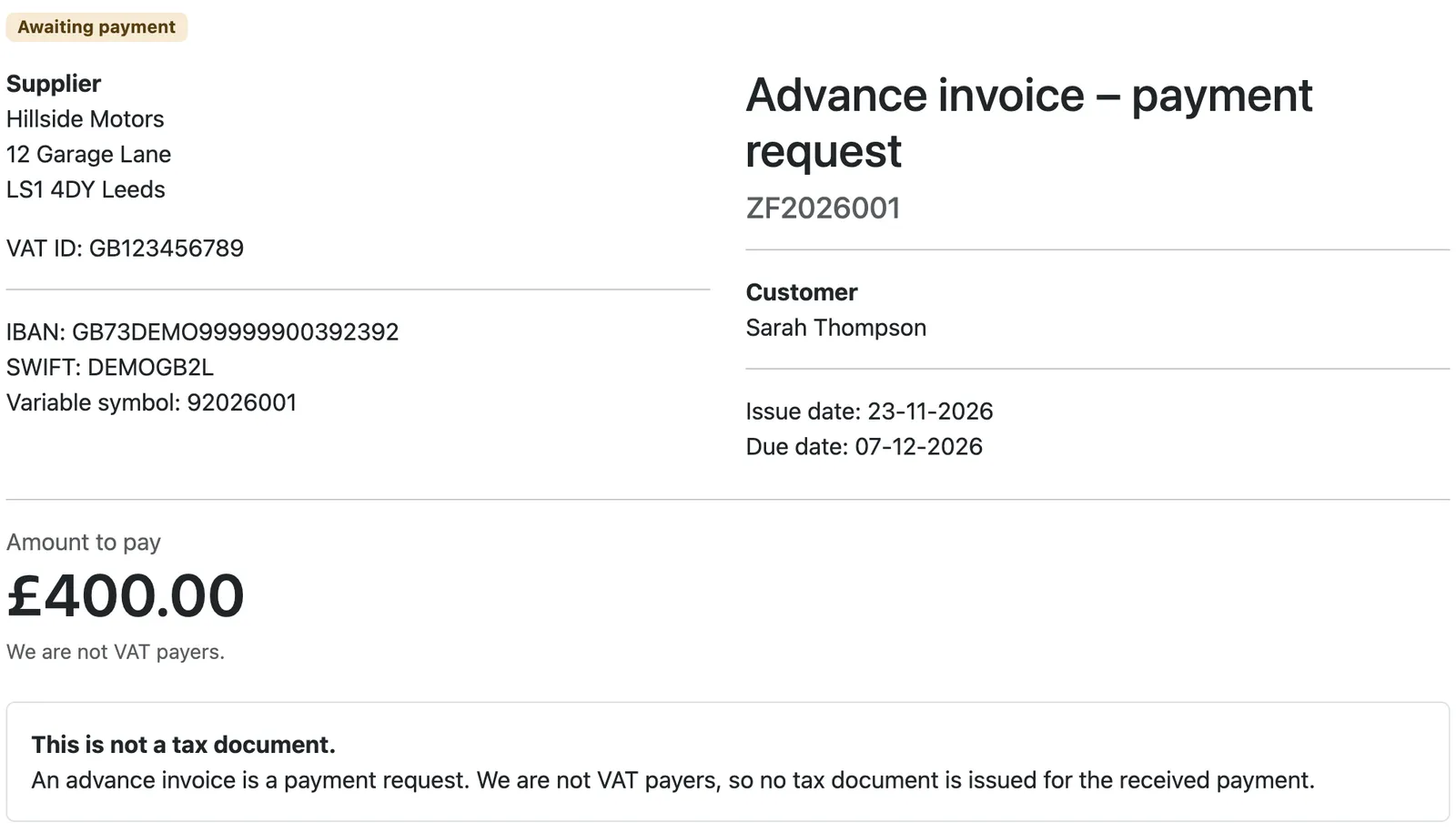
You can now issue an advance invoice for a service job, a request to pay an advance. Once the customer pays, you record the payment and the job's final invoice deducts the paid advance automatically.
Advance invoice straight from the service record, with a PDF to print or send by email, and a payment QR code for Slovak and Czech workshops
Advance invoices for direct sales too
Record the received payment, also directly from the list, including the date it was received
The paid advance is deducted on the invoice for the same job
A list of advance invoices filtered by status and period, and an advance indicator on the job
Correct or delete an unpaid advance invoice, and reverse a payment recorded by mistake until an issued invoice deducts it
An advance invoice is not a tax document; for Slovak VAT payers Autolog shows the deadline for issuing one
Service
Service Intervals and Interval Templates
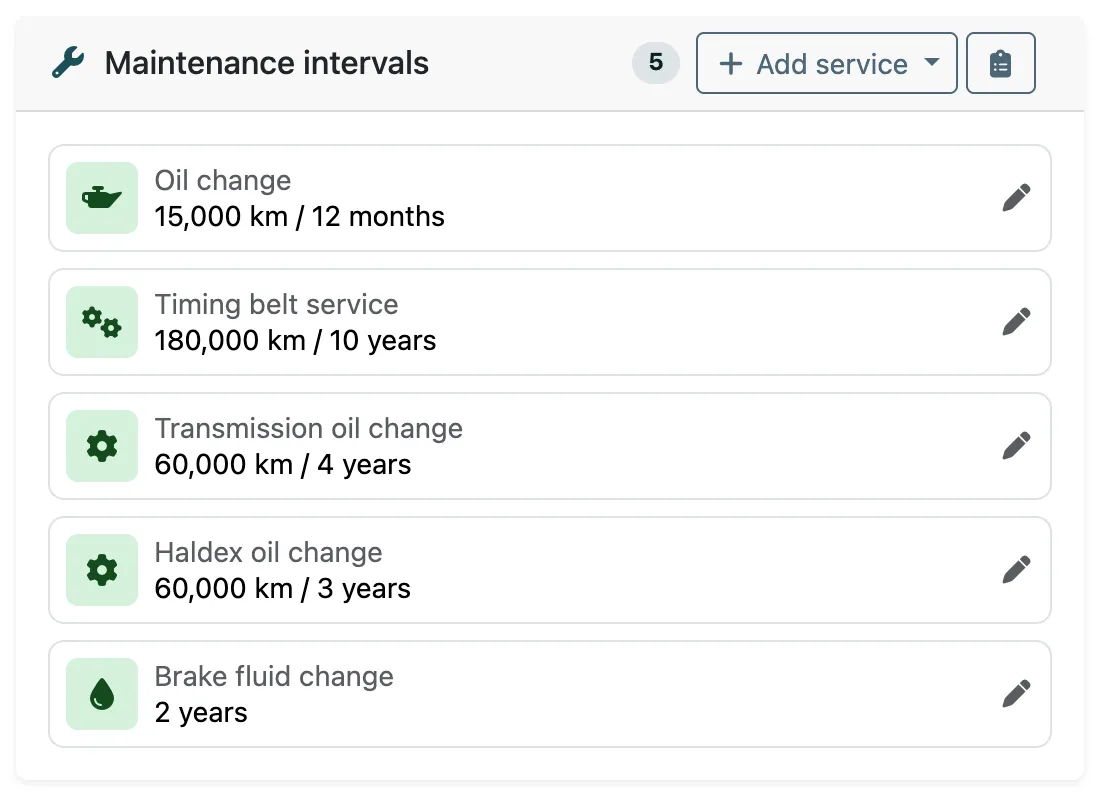
Manage a vehicle's service intervals from a single card on the vehicle detail. Prepare templates for new vehicles so you don't have to enter the same intervals again and again.
A service intervals card on the vehicle overview: add, edit or remove a service without opening the whole form
Workshop interval templates, for example for a standard car, a long-interval diesel or a taxi, to choose when creating a vehicle
Apply a template to an existing vehicle too, with a preview of what will be added, changed or removed before you confirm
Your own default oil change interval for all new vehicles in the workshop
Intervals and reminders for transmission oil, front and rear differential oil and the Haldex coupling
A vehicle shows and reminds only the services it actually has; removing a service cancels its pending reminders
App
A New Look for the App
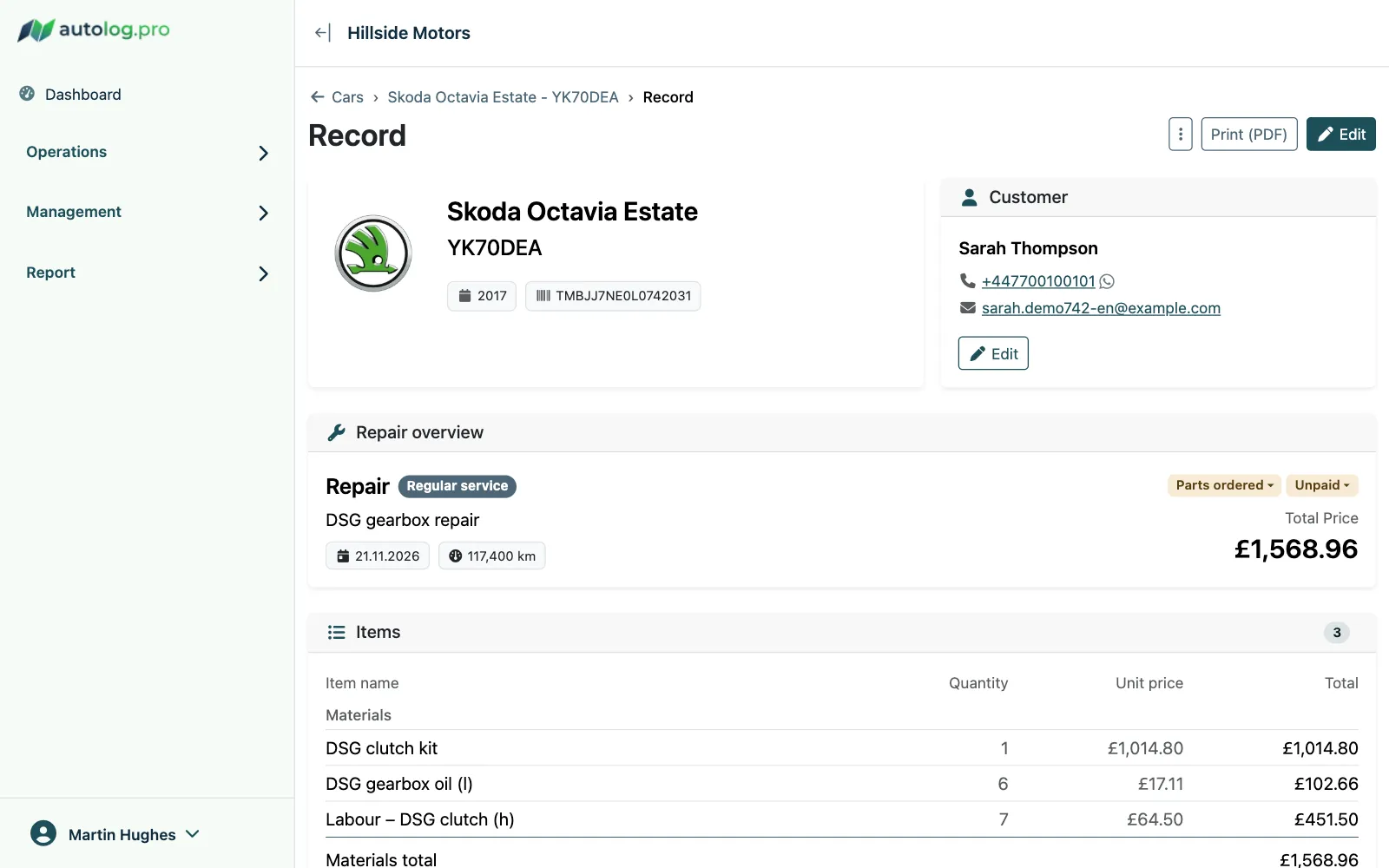
Autolog has a new layout with a sidebar menu. The app offers it to you on its own, and you can switch back to the original look at any time from your profile menu.
A sidebar menu with grouped sections and a workshop switcher in the top bar
A redesigned vehicle list, detail and form with navigation and actions in the page header
A service record header with vehicle and customer cards
New stored tyres screens; start a new storage straight from the list by picking a car
Clearer screens for users, services, workplaces and item templates
Your layout choice is saved to your account, and light and dark mode stay as they are
Service
Vehicle Condition Inspection
You can now record a vehicle condition inspection at the service record instead of on a paper form. The vehicle details are filled in automatically and the inspection is completed step by step, on a phone right at the car as well.
59 checkpoints in 8 sections with the statuses OK, Monitor, Needs attention and Not applicable
Measurements of brakes in %, tyre tread in mm, DOT, fluids and battery voltage
A "Rest of section OK" button and a summary of findings before the inspection is completed
A colour PDF report for the customer with the findings summary on the first page and section illustrations, to print or send by email
The vehicle shows its inspection history and the findings of the latest completed inspection for the next service
AI handover explanation: prepares a text for the customer from the work and the inspection findings, which you edit and copy before use
Fleet
SECAR GPS Integration
Besides Fleetware, Autolog now also reads vehicle mileage from SECAR, so service reminders are based on real mileage.
Add SECAR in the workshop's GPS integration settings
Automatic vehicle pairing and regular mileage synchronization
Read-only access, Autolog changes nothing in SECAR; sign-in credentials are stored encrypted
Fleet
Fleet: What Needs Attention in Your Fleet
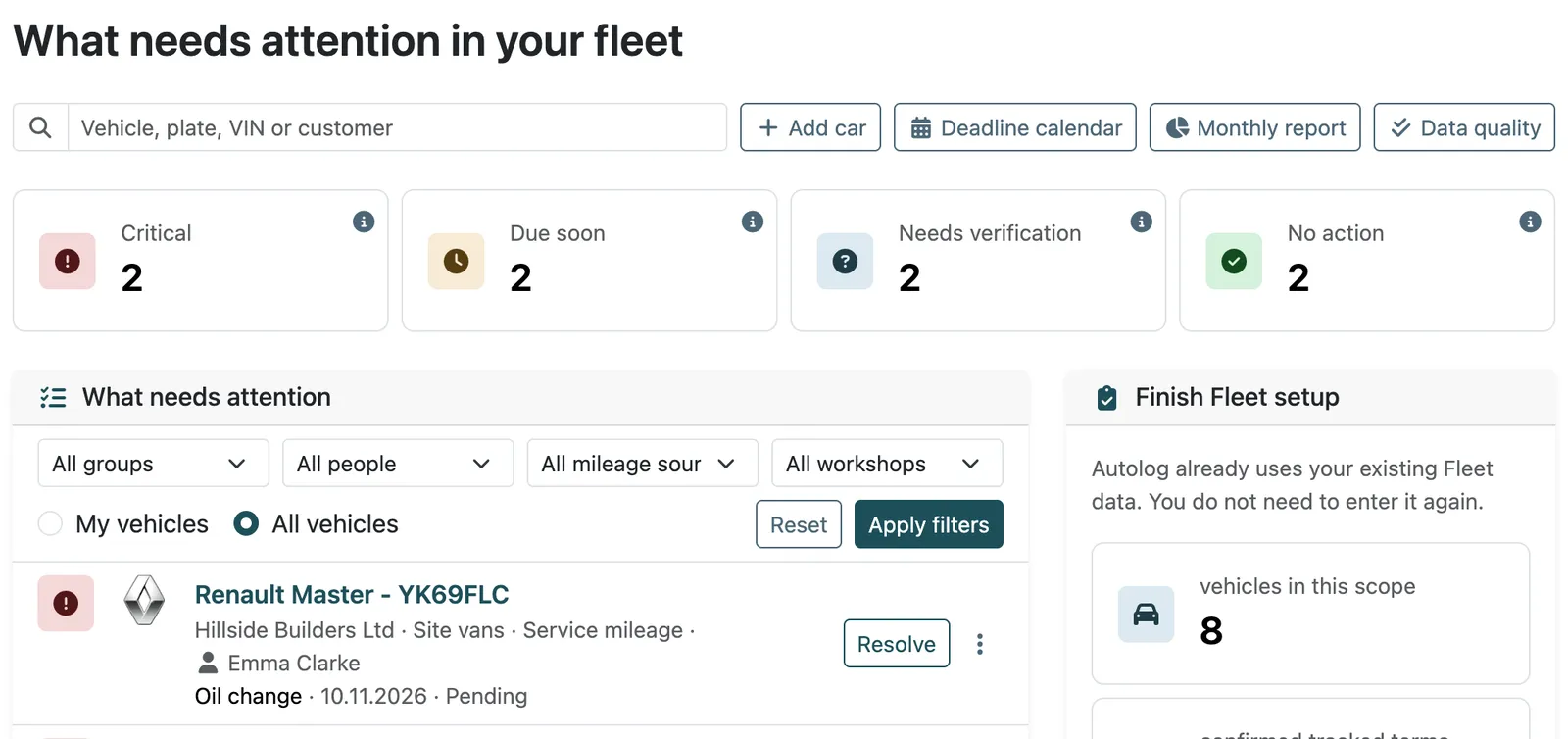
The Fleet dashboard sorts vehicles by urgency, so a fleet manager immediately sees what is overdue, what is coming up and where data is missing.
Vehicle states Critical, Due soon (within 14 days), Needs verification and No action
Filters by vehicle group, responsible person, mileage source and workshop
Vehicle groups and bulk changes for up to 200 vehicles at once: group, responsible person and mileage source
A data quality check separates confirmed deadlines from data that needs to be verified or completed
A monthly fleet report by email for chosen recipients: completed tasks, critical deadlines and deadlines in the next 90 days
A setup guide for new and existing Fleet vehicles
July 2026
Inventory
AI-Powered Stock Receipt Scanning
Upload a supplier delivery note, invoice, or receipt as a PDF or photo and Autolog prepares an editable stock receipt from it.
AI reads the supplier, document number and date, stock lines, supplier codes, quantities, and prices
Supplier codes confirmed during receipt posting are saved to stock items and become searchable
Review and correct every field before saving a draft or posting stock
The original document remains attached to the stock receipt as source evidence
Inventory
Supplier Management in Inventory
Inventory now has dedicated supplier records so receipts, stock items, and imports are connected more clearly.
New supplier records with contact, address, and account details
Suppliers linked to receipts, document lines, and stock items
CSV imports can use a supplier's default format or create the supplier automatically
Archive suppliers without losing stock record history
June 2026
Service
Tablet Signatures for Service Protocols
Acceptance and handover protocols can now be signed directly on a tablet, so you can finish customer paperwork without printing or scanning.
Sign acceptance and handover protocols directly on the tablet
Customer signs on the spot during vehicle intake or handover
Signed PDF stays attached to the service order with signer name and signing time
Mechanics
Mechanics Without System Access
You can now keep mechanics in Autolog and assign work to them without giving them an email, password, or system access.
Assign service work, absences, and reports without login credentials
Users without access cannot sign in and do not receive system emails
Useful for internal mechanics and shop-floor staff where work tracking is enough
Mechanics
Mechanic Absences and Better Capacity Planning
Workshop availability settings can now track vacations and other mechanic absences so scheduling better reflects your team's real capacity.
Absences by mechanic, date, and time
Conflict warnings for already assigned service work
List and visual overview of team availability
Bookings
Public Booking Slots per Service
You can now set how often public booking slots should be shown for each service.
Separate public slot interval directly in service settings
Offer slots, for example, every 15, 30, or 60 minutes
The real duration of the service and options still blocks the calendar correctly
May 2026
Inventory
Advanced Inventory Management
Inventory now has new documents, reports, and controls so it is clearer what came in, what went out, and what needs replenishing.
Stock receipts, stock issues, drafts, voids, and receipt supplements
Inventory counts, stock corrections, returns to stock, and archived items
PDF printing and email sending for stock documents
Movement Ledger, Inventory Differences, and Replenishment reports with CSV export
Customers
Google Reviews by SMS
We added a way to ask customers for a Google review by SMS with a direct link to your review profile.
Send the request from the customer card or a completed service record
Resend the request when needed
Mark customers who have already left a review
Filter customers by Google review status
Invoices & finance
Enter Prices With or Without VAT
Workshop settings now let you choose whether your daily price entry should use prices with VAT or without VAT.
One setting for how prices are entered across the workshop
Applies to service records, direct sales, stock, templates, and the service catalog
Totals and public prices remain clear with VAT included
April 2026
Service
Service Monitor for Reception
The Service Monitor is now ready for reception screens on a TV or tablet so both customers and staff can immediately see what is waiting, what is currently in progress, and what was completed most recently.
Waiting queue with today's current order of vehicles
Overview of vehicles currently being worked on
Recently completed vehicles from today on one screen
Clear shared view for customers and reception staff
Invoices & finance
Profit Summary in Service Record
We added a new Profit Summary to the service record detail so you can check job profitability immediately without switching to reports.
Quick financial overview directly in each service record
Better control over profitability per individual job
Less clicking during daily performance checks
Mechanics
Technician Worksheet
You can now print a clear mechanic-facing worksheet from a service record without prices, with optional internal notes and space for handwritten notes directly in the workshop.
A4 worksheet print directly from the service record
No prices or customer-facing details, better suited for workshop execution
Select internal notes and leave space for handwritten mechanic notes
March 2026
Bookings
More Accurate Online Booking Availability
Online reservations now better respect one-time closures and special opening hours set by the workshop.
Workshops can temporarily stop accepting bookings for a specific date and time
Customers only see slots that are truly available to book
Useful for holidays, business trips, seasonal closures, or exceptional downtime
Fleet
Shared Service History for Fleet Vehicles
Fleet vehicle detail now also shows shared service records from other workshops.
Unified timeline with local and shared records
Clear read-only marking for shared records
Shared item details, mileage, and date directly in the overview
Fleet
GPS Sync for Mileage and Reminders
Added GPS integrations to automatically load mileage and improve reminder scheduling accuracy.
New GPS Integrations section (Fleetware) in workshop settings
Automatic vehicle matching by plate number and GPS mileage import
“Sync now” button plus regular nightly synchronization
More accurate mileage-based reminder recalculation from real usage
February 2026
Invoices & finance
More Accurate Financial Overview in Reports
Reports now make the difference between labor revenue and labor profit much clearer.
New labor revenue metric alongside labor profit
Added info popovers next to key numbers
Clearer share of labor and parts in total income
Service
Label for Next A/C Service
The A/C service label now automatically includes the date of the next service.
Next date calculated from vehicle service intervals
Clearer customer information when handing over the car
Available directly in the service label print
Service
Last Completed Service in Cars List
The cars list now shows the date of the last completed service without opening car detail.
Faster overview when planning the next service
More precise date of the last completed work
Better orientation when working with many vehicles
Service
Better Service Record Filters and Stats
Service record overview is now clearer and faster for daily operations.
Payment status filter (paid/unpaid)
Clickable stats now preserve active filters
Better filtering for completed records in the current month
Bookings
Minimum Lead Time for Online Bookings
You can now set how many hours in advance customers can create an online reservation.
Prevent last-minute bookings
Simple setup in Workshop Settings
Applies to online bookings
Customers
Automatic SMS Reminders for Vehicle Inspections
We added an option to enable automatic SMS reminders for technical and emissions inspections.
Turn on/off as needed
Reminders are sent automatically
Messages are localized by language
Invoices & finance
Enhanced Payment Report with Analytical Insights
The overview report now includes detailed analytical breakdown of payment status with trends, efficiency, and comprehensive insights.
Revenue and unpaid invoice trends with percentage changes
Detailed breakdown by payment status
Order completion success rate
Efficiency analytics with averages per order and service record
Invoices & finance
Service Record Payment Status Tracking
Each service record now has its own payment status for better financial flow control.
Five statuses: Unpaid, Pending, Paid, Refunded, Failed
Automatic synchronization with invoices and service orders
Color-coded status indicators directly in the service records list
Quick status change with a single click
January 2026
Bookings
Custom Colors for Reservation System
Workshops can now customize color schemes in the reservation calendar to match their brand identity.
Customizable colors for different reservation types
Better visual identification in the calendar
Service
Internal Notes with Real-time Updates
We added an internal notes system for better team communication on service records.
Real-time note updates without page refresh
Optional email notifications for new notes
Read/unread note tracking
Unread notes indicator
App
Simplified Quick Actions on the Dashboard
We reorganized the quick actions section and removed duplicates so you can reach common tasks even faster.
Faster layout for the most-used actions
Less clutter thanks to removed duplicates
Clearer panel without unnecessary scrolling
December 2025
Service
More Service Label Types
We expanded service labels to cover more specific maintenance tasks.
Oil, brake fluid, coolant
Timing system (belt/chain), transmission oil, general service
Quick printing directly from the service record
Service
More Accurate Mileage Estimates
Improved average mileage calculation so reminders and maintenance intervals are more precise.
Service
Equipment Servicing
You can now service gear without a VIN (e.g., garden machinery) and print its QR codes/labels.
November 2025
Mechanics
Work Time Tracking for Mechanics
We've introduced a comprehensive work time tracking system for mechanics that enables precise measurement of time spent on individual service records.
Start/stop timer for each mechanic on a service
Global indicator of running timers in the navigation menu
Overview of all active timers in a dropdown menu
Automatic recording of actual work time
Detailed work hour reports for each mechanic
Better productivity control and more accurate cost calculations
The system is intuitive and easy to use – mechanics simply start the timer when beginning work and stop it upon completion. All times are automatically recorded and available in reports.
Service
Internal Notes for Service Records
We've added the ability to maintain internal notes for service records that are visible only to workshop staff.
Private notes not shared with customers
Edit and add notes directly in the service record
Complete change history of notes
Track who and when modified notes
Ideal for internal notes about work complexity, special tools used, or important details that customers don't need to see.
Older news
October 2025
Service
Filter Service Records by Type
We added a record type filter to the Service Records list, so you can quickly find exactly what you need.
Toggle: All / Service records only / Pricing quotes only
Fast filtering – selection is applied automatically
Works together with search and status filter
App
Workshop Public Name – Two Names for One Workshop
Some workshops have a billing name and want a different public display name. Now it's possible!
Billing Name (Legal/Official) – used on invoices and official documents
Public Display Name – optional, shown on website and booking system
Easy setup in Workshop Settings
If public name is not set, billing name is used automatically
Example: Invoices keep the name "ProMotor Ltd.", but customers see "Quick Service" on the website.
Want to try Autolog?
Didn't find what you were looking for? Contact us,
we'll be happy to listen.